Vaults on UTXO blockchains like Bitcoin work differently from how they work on account-based blockchains.
Features of Bitcoin vaults:
- Bitcoin vaults have only one chain (Bitcoin) and one asset (BTC).
- Each vault can have many addresses. There are three address types:
- SegWit (Bech32) address format - this is the default address format when creating new addresses
- Legacy address format
- Taproot address format
- There is one address in the vault, which is considered the “default” address. In case of a Vault1-to-Vault2 transaction, the receiving address in Vault2 is the default address. The change of a transaction is always sent to the vault's default address.
- You can assign a name to an address -- this is useful for off-chain tagging of addresses.
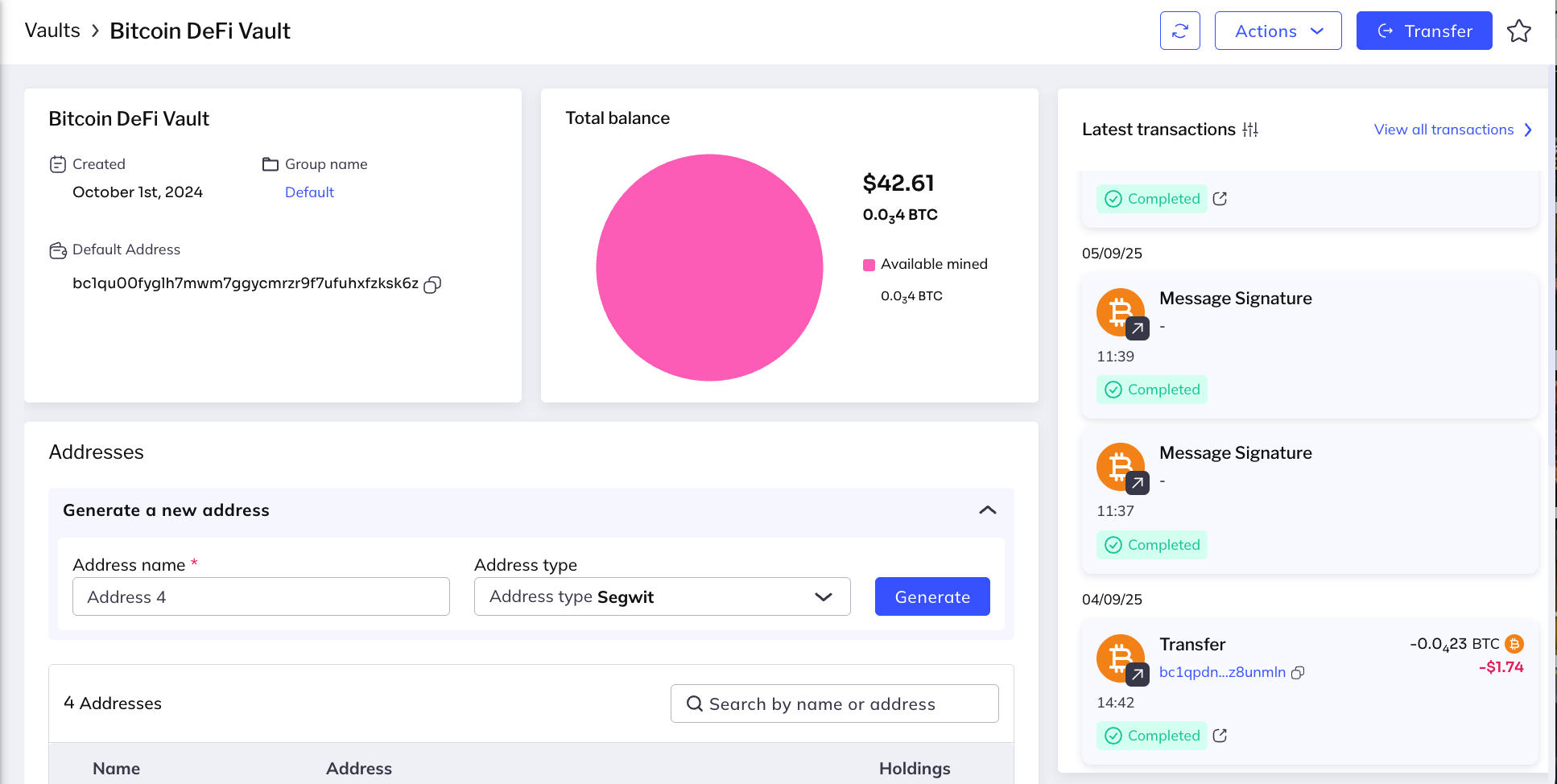
The upper-left panel displays:
- Name of the vault
- Date of creation
- Group to which the vault belongs
- Vault's default blockchain address
- Total vault balance
Buttons on the upper right let you:
- Send transfers and deposits
- Download a snapshot of the vault
The panel at the bottom of the screen displays details of the addresses associated with the vault and lets you generate additional addresses.
This panel displays summary details of the latest transactions that were sent from the vault.
- Click any transaction to see its details.
- Click View all transactions at the top of the panel to jump to the Transactions page.