Safe{Wallet} (formerly Gnosis Safe) is widely used by institutional and DAO clients as a multi-signature smart contract wallet, providing strong governance and shared control over on-chain assets.
You can connect your Safe accounts to Fordefi when Fordefi is one of the Safe signers. This combines Fordefi's MPC security, DeFi connectivity, and policy enforcement with Safe's multisig governance model.
When you connect a Safe{Wallet} to Fordefi as a Safe vault:
- Safe-originated transactions and messages are clearly identified as Safe actions in Fordefi. See Safe Transactions.
- Decoded transaction details are shown in human-readable form, instead of raw payloads.
- The Safe vault participates in Fordefi policy evaluation as a first-class transaction origin. See Safe Transactions in Policies.
- Native asset balances in the Safe are displayed, and Safe transactions are tracked from the moment the vault is added.
If you do not add the Safe as a vault, Fordefi cannot enrich Safe operations and they appear as raw message signatures.
Fordefi presents the Safe vaults that you have connected in a dedicated screen in the web console. View them by choosing Connected Accounts > Multisig:
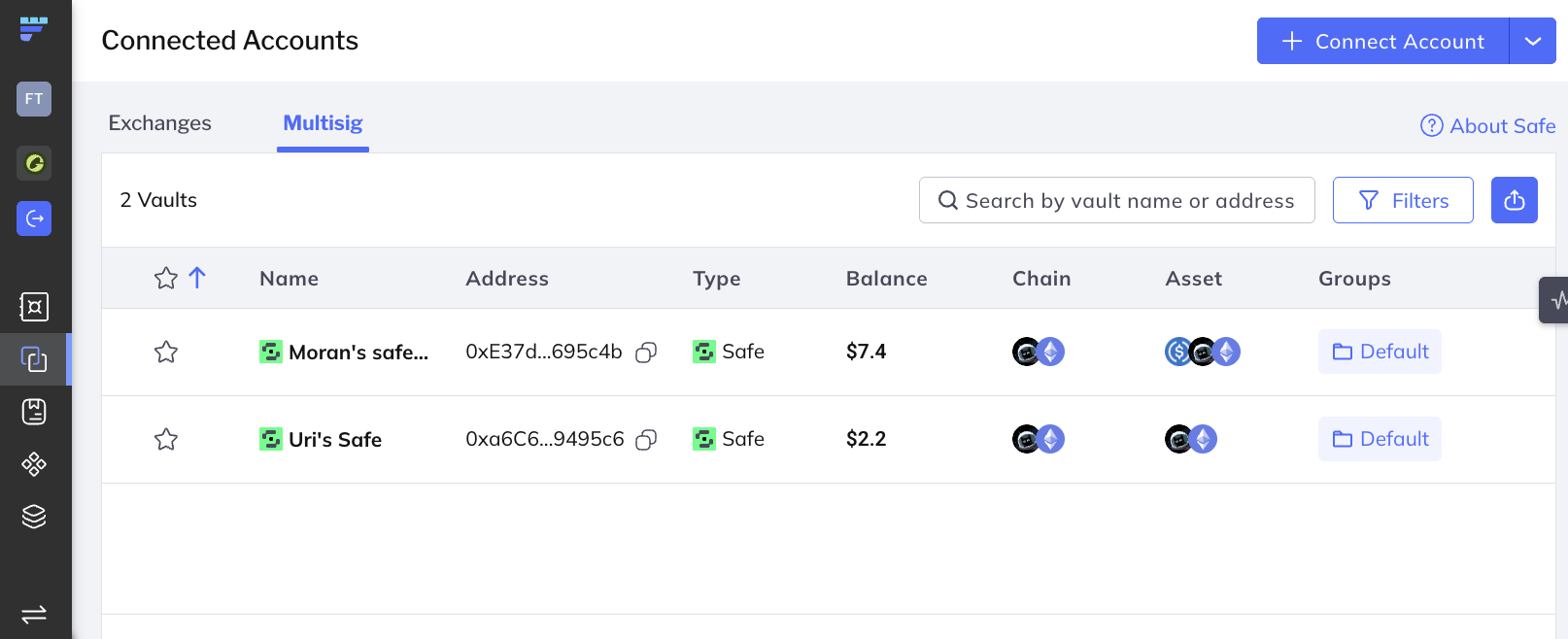
Here's how to connect to a Safe{Wallet}:
In the Fordefi web console, click Connected Accounts in the side menu. In the screen that is displayed, click Multisig.
This dialog opens:
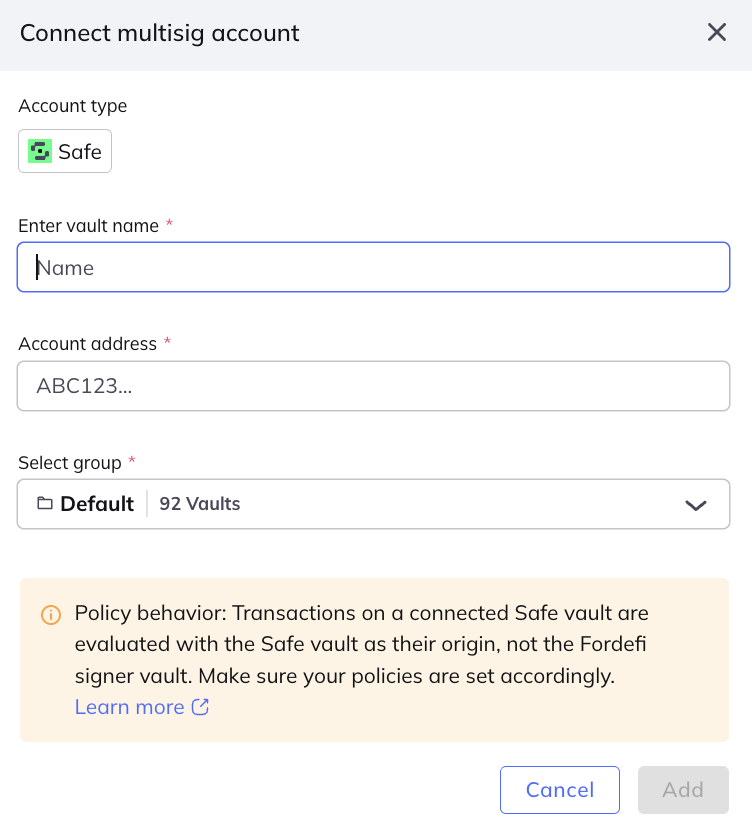
Provide details for the account vault:
- Select the smart account type (currently, only Safe{Wallet} is supported).
- Enter a unique vault name.
- Select the Safe account address.
- Select a vault group.
Click Add.
The request is sent to the Admin Quorum for approval. Once approved, the Safe{Wallet} appears in your Multisig accounts list.
After a Safe{Wallet} has been added:
- Native assets held in the Safe are detected and displayed automatically.
- Safe transactions are included in indexing and tracked from the moment the vault is added. Historical Safe transactions that occurred before vault creation are not retrofitted.
A Safe vault represents the on-chain Safe in Fordefi. Fordefi does not bypass the Safe's signature threshold or submit transactions on behalf of other Safe signers.
The following actions are blocked from a Safe vault:
- Sending transfers
- Performing swaps
- Revoking allowances
- Selecting the Safe vault as a signer in the Fordefi browser extension
These actions must be initiated through Safe by the Safe owners, with Fordefi acting as one of the signers.
- Admins have full operational and configuration privileges within Fordefi for the Safe vault. Admins cannot bypass Safe's on-chain signature threshold.
- Traders without view permissions on the Safe vault cannot open the single vault page. They can still see the Safe vault name in transaction history (for example, when their own vault receives a transfer initiated through Safe).