Fordefi checks each policy rule as you build it and flags condition combinations that can never match a transaction. Instead of discovering a misconfigured rule later, you see the problem at the moment you create or edit the rule.
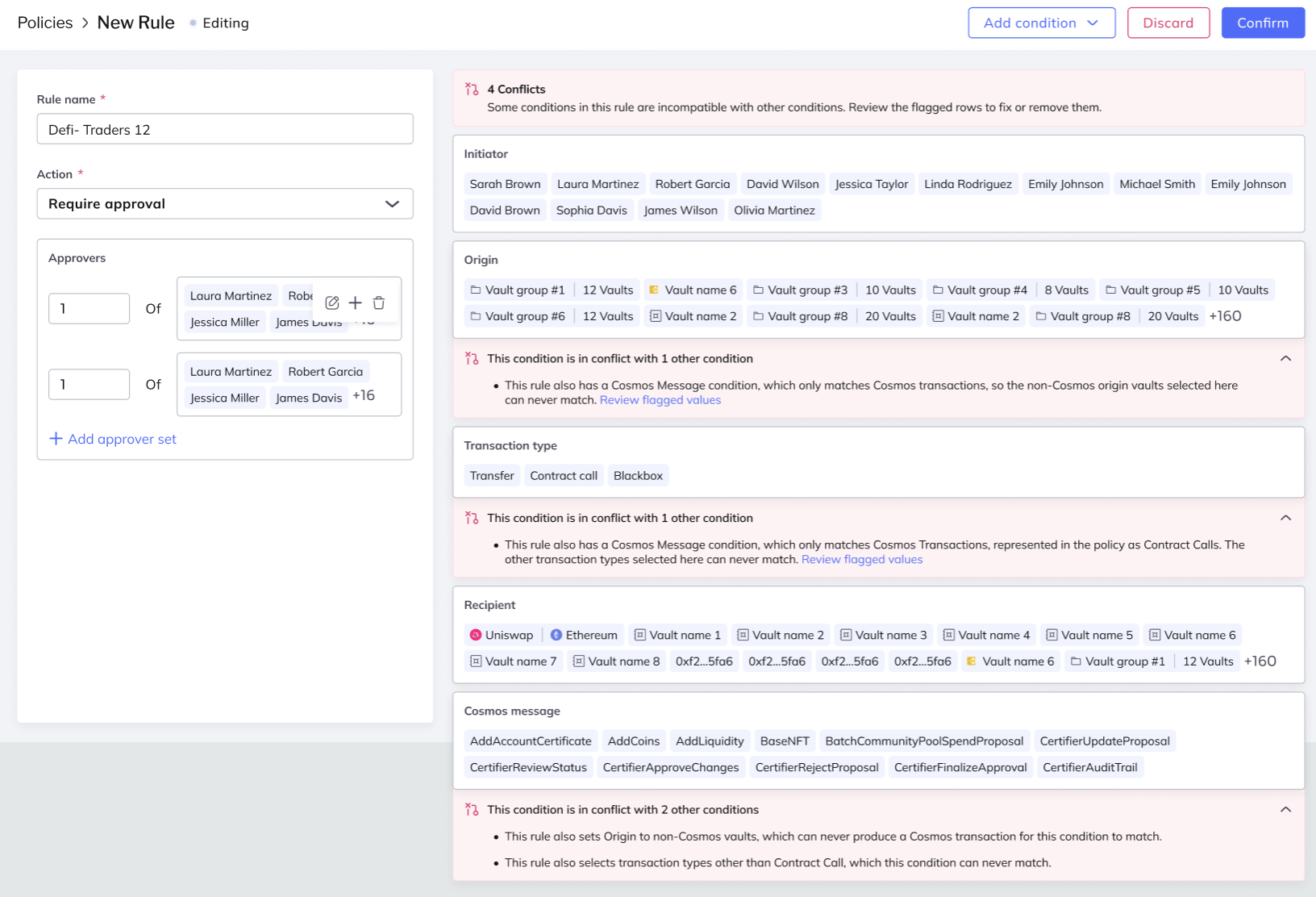
This matters because a rule that can never match creates a false sense of security: you may believe a transaction type is protected by a rule that will, in practice, never take effect. Rule validation surfaces these issues at creation or edit time.
Validation runs only while you author a rule — when you create or edit it. It never changes how existing rules are evaluated. See Rule Conditions and Actions for the full list of conditions and the table of which conditions apply to which transaction types.
Rule validation surfaces warnings inline, next to the conditions that cause them. A warning never blocks saving, and Fordefi never changes your rule for you: you acknowledge the warning and can still save the rule as it is. This lets you catch a misconfigured rule at authoring time without being forced into a change you did not intend.
Fordefi warns when a rule combines conditions that can never match a transaction. Most stem from a condition applying only to specific transaction types or blockchain families — the same compatibility summarized in Conditions and transaction types.
The following are some of the most common:
The ABI condition applies only to EVM contract calls. It conflicts with:
- A Transaction type other than Contract call. Because customers use ABI conditions with the Allowance type to match
approvecalls, that combination is allowed. - A non-EVM vault in the Origin condition.
- A non-EVM vault, contact, or DApp in the Recipient condition.
- A non-EVM token in the Asset condition.
- An EVM typed message condition in the same rule.
- A Cosmos message condition in the same rule.
The Cosmos message condition applies only to Cosmos contract calls. It conflicts with:
- A Transaction type other than Contract call.
- A Recipient condition.
- A non-Cosmos vault in the Origin condition.
- A non-Cosmos vault, contact, or DApp in the Recipient condition.
- A non-Cosmos token in the Asset condition.
- An EVM typed message condition in the same rule.
- An ABI condition in the same rule.
The EVM typed message condition applies only to the EVM Typed data message transaction type. It conflicts with:
- Any Transaction type other than EVM Typed data message. Because customers use this condition with the Allowance type to match permits, that combination is allowed.
- A non-EVM vault in the Origin condition.
- A non-EVM vault, contact, or DApp in the Recipient condition.
- A non-EVM token in the Asset condition.
- A Cosmos message condition in the same rule.
The Recipient condition conflicts with:
- A Transaction type of EVM Personal message, Non-EVM message, or Black-box signature.
- A Cosmos message condition in the same rule.
The Asset condition conflicts with a Transaction type of EVM Personal message, Non-EVM message, or Black-box signature.
The Transaction amount and Periodic amount conditions conflict with a Transaction type of EVM Personal message, Non-EVM message, or Black-box signature.
A single rule can select more than one transaction type. When a condition applies to some of the selected types but not all of them, validation shows a non-blocking warning that you must acknowledge before saving. The rule still matches the applicable types; the condition simply has no effect on the others.
Rules created before rule validation are never modified by Fordefi. A rule continues to evaluate exactly as it did before validation shipped. Validation applies only when you author a rule.
When you open an existing rule whose conditions form a combination that validation would flag on a new rule:
- A banner appears and the affected conditions are highlighted, explaining the issue.
- You can still save the rule unchanged. This lets you make an unrelated edit without being forced to re-architect the rule.
- If you resolve the issue during the edit, the banner and highlights clear automatically, and saving proceeds through the standard validation path.
The same warnings appear when you create a new rule or duplicate an existing one. As everywhere, a warning never blocks saving — you acknowledge it and can save.
In the policy rules list and rule detail views, rules that contain a flagged combination are marked with an inline indicator so you can find and review them proactively. No action is required from these views.