Use Fordefi's Recovery Tool to recover your organization's private keys, independently of Fordefi.
To recover an organization's private keys, you must must possess the following:
- The encrypted backup snapshot.
- The recovery phrase of each dedicated admin (when using the Recovery Phrases backup method), or the private key matching the public key used for backup (when using the Public Key Upload backup method).
Together, they allow you to reconstruct the private keys, independently of Fordefi.
Recovering private keys should be performed on an external, offline device.
- Download the Fordefi recovery tool. For your security, we provide the SHA-256 hash of each ZIP file so you can verify the integrity of your download. The checksums apply to the ZIP archive itself (not to the contents inside). You can find these hashes here: Checksums.
MacOS Intel
Download Recovery Tool
MacOS Apple Silicon
Download Recovery Tool
Linux
Download Recovery Tool
Windows
Download Recovery Tool
- Extract the recovery tool .zip file.
- Extract the backup snapshot .zip file.
- Put the recovery tool and the backup snapshot in the same directory, and then open a terminal and navigate to this directory.
- Depending on the backup method you have used, proceed to one of the following sections:
Run the command that suits your operating system:
recovery-tool.exe key-share-recover -p '\path\to\backup.json' -o output_file.csvWhen prompted, enter the minimum number of recovery phrases, as configured during the backup. Do this as follows:
Enter mnemonic #1: afraid pole typical never dad symbol present stable adult garbage climb riot
Enter mnemonic #2: hybrid puppy section doll mention next deal eight agree erase lunch observeRun the command that suits your operating system:
recovery-tool.exe public-key-recover -p '\path\to\backup.json' -k my_file/private_key.pem -o output.csvEnsure you have the backup_snapshot.json, Fordefi recovery-tool binary and the appropriate recovery script (run_recovery.sh for macOS/Linux or run_recovery.bat for Windows) in your working directory.
Your YubiKey should contain an RSA-2048 private key in PIV slot 9D with a 6-8 character PIN configured.
For the full recovery process, scripts, and detailed instructions, see the Fordefi API Examples GitHub repository.
Run the following commands, as suit your operating system:
Prerequisites:
- Install YubiKey Manager
- Install OpenSC
Verify YubiKey:
& "C:\Program Files\OpenSC Project\OpenSC\tools\pkcs11-tool.exe" --module "C:\Program Files\Yubico\Yubico PIV Tool\bin\libykcs11.dll" --list-objects --pin YOUR_PINRecovery command:
.\recovery-tool.exe public-key-recover -d "cmd /c run_recovery.bat YOUR_PIN" -p "backup_snapshot.json" > private_keys.csvThe following options for the recovery tool are available for all the recovery methods described above.
-pspecifies the path to the .json file that was generated during the backup process. Here, it isbackup.json.-bcan be used instead of-p. It lets you input the contents of the .json file through stdin.-o(optional) specifies the output file. In the example,output_file.csvcontains the recovered private keys. If this option is not used, the output will be displayed in stdout.-k- When using the "public key upload" method, this option specifies the path to a file that lets you provide the private key in PEM format.
- When using the "recovery phrases" method, this options lets you provide the admins' recovery phrases. If this option is not used, you can enter the recovery phrases later, when prompted.
--export-electrum-dir(optional) A directory. If provided, Fordefi exports into this directory private keys that can be easily imported into an Electrum Bitcoin wallet. Fordefi creates one file per vault with all the vault's keys in both legacy and SegWit formats.--silent-verificationverifies the contents of a backup snapshot: vault addresses, derivation paths, and chain metadata - without triggering a full recovery flow or exposing any private key material. Also, with this option, there is no sensitive input echo: mnemonic entry is not displayed while typing; nor are mnemonic, or reconstructed key material printed to the screen or files.
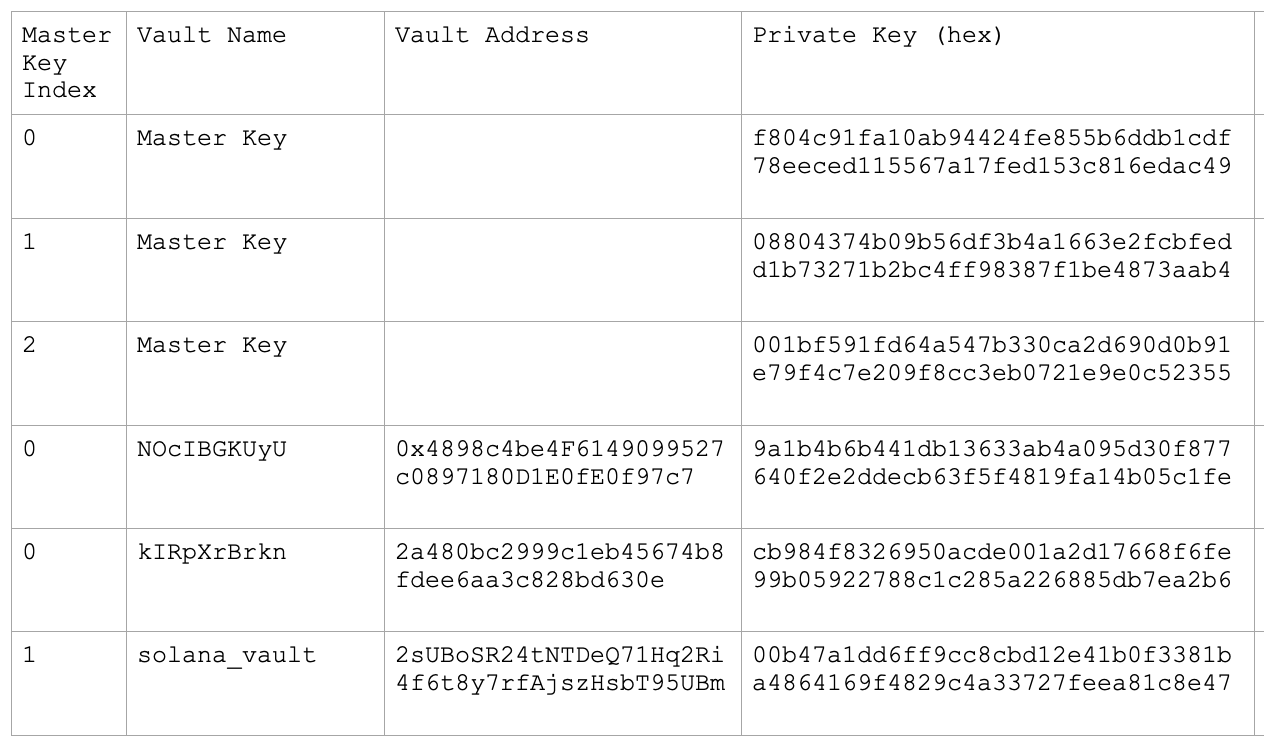
The output consists of private keys (in hexadecimal format) for each of the vaults created in your Fordefi workspace. For example:
You can now use the recovered private keys to access your funds.