Use an API User and webhooks to build a custom Co-Signer to perform automated validations on Fordefi transactions.
In Fordefi, an API User's function is not limited to initiating transactions, like human users. They can also be part of a transaction rule approval quorum in your policies and act as a custom Co-Signer — performing automated verification tasks such as making sure that the recipient of a swap is not a malicious address.
To run this setup you will need to:
Create an API User with
Traderrole and save its access tokens. Learn more.The example uses an API User named
Validator Bot, which will serve as our custom Co-Signer and enforce custom rules you define.Set up a modified webhook server that will receive events from Fordefi. Learn more.
- This guide uses a modified server designed to enforce a number of custom rules. For example, it can analyze a transaction bridging USDC from Solana to Ethereum to enforce that the recipient Ethereum wallet is whitelisted, or it can parse the call data / EIP-712 messages in EVM transactions from your Fordefi organization to make sure the recipient of a swap is always
msg.sender.
- This guide uses a modified server designed to enforce a number of custom rules. For example, it can analyze a transaction bridging USDC from Solana to Ethereum to enforce that the recipient Ethereum wallet is whitelisted, or it can parse the call data / EIP-712 messages in EVM transactions from your Fordefi organization to make sure the recipient of a swap is always
Since the Co-Signer has the authority to approve or abort transactions, it's critical to lock down the webhook endpoint that it exposes.
Verify webhook signatures. Every webhook that Fordefi sends includes a signature header. You should verify this signature against Fordefi's public key to confirm that the payload genuinely originated from Fordefi and that it hasn't been tampered with. See the webhook validation documentation for the public key and implementation details.
Whitelist Fordefi's IP. Restrict inbound traffic to your Co-Signer server by whitelisting Fordefi's NAT address:
54.243.103.88This ensures that only Fordefi's infrastructure can reach your webhook endpoint. Any requests originating from other IPs can be dropped at the firewall or load balancer level before they ever hit your application.
Combining both measures — signature verification at the application layer and IP whitelisting at the network layer — gives you defense in depth against spoofed or unauthorized webhook calls.
Create a policy with a single-set approval quorum including
Validator Botas your custom Co-Signer: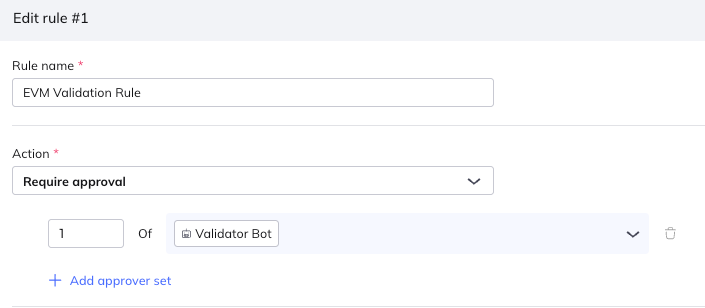
This quorum implements the following logic: The Co-Signer only approves EVM transactions that pass your custom validation checks. If validation fails, it automatically aborts the transaction using the
/transactions/{tx_id}/abortendpoint documented here.Note: More approver sets could be added, potentially adding human approvers to the quorum, but in the example here, the Co-Signer is designed to keep things as automated as possible.
Now, build the rest of the policy:
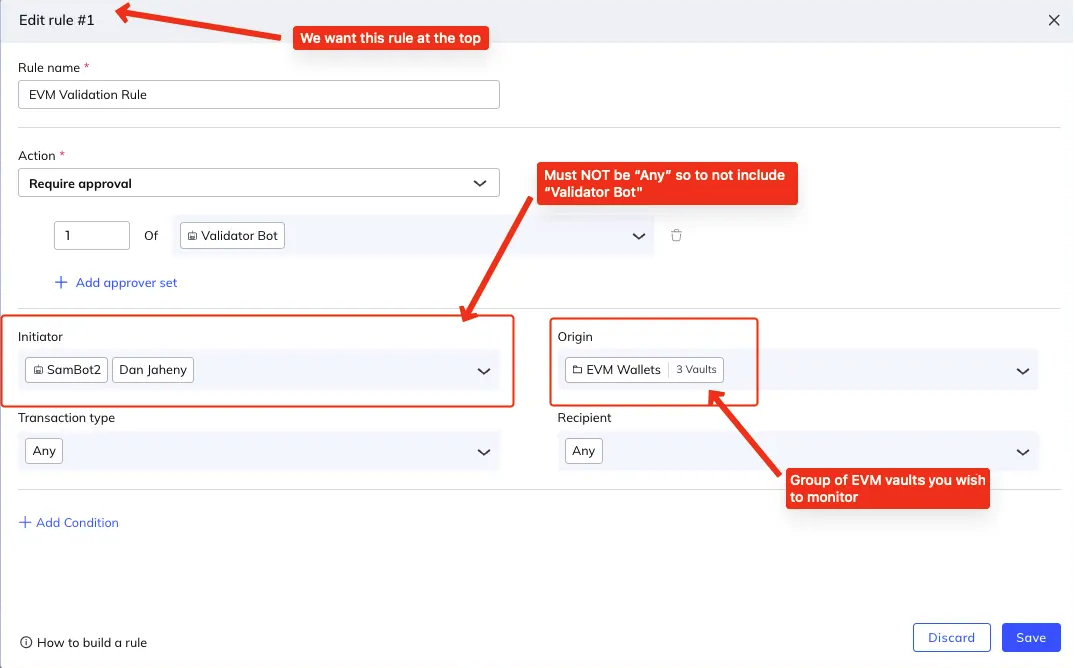
The Co-Signer must be able to scan every EVM transaction that is broadcast, so build the policy rule using
Transaction type=Any,Recipient=AnyandOriginto be a Vault group containing all your EVM vaults. (Learn more about setting up Vault groups.) The policy must also be ranked at the top of your policy rules, to ensure all EVM transactions will be evaluated.Fordefi's backend assumes that the initiator of the transaction always provides tacit approval, so it's very important that the Co-Signer API User is never used to initiate transactions. This is why the example does not use
Anyinitiator in the policy.Create EVM transactions and monitor your server and policy matching. If all works well, any transaction that passes validation will be co-signed automatically. Transactions that fail validation, however, will be automatically aborted by the Co-Signer before they can be signed by the API Signer or its human initiator.